
Supervise every deal.
Manage none of them.
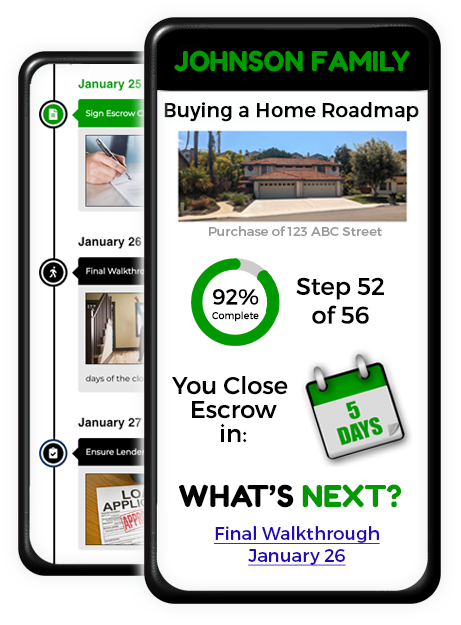
What’s Next gives brokers real-time oversight and an auditable record, while agents work on the rails you set and clients stay informed at every step. Now everyone knows what’s next.
The #1 problem in real estate isn't bad agents.
It's a lack of oversight.
California’s Department of Real Estate is clear: brokers must exercise reasonable supervision over every salesperson and every transaction they’re responsible for. But “reasonable supervision” is hard to prove when every agent runs deals their own way, in their own inbox, on their own timeline.
Brokers must exercise reasonable supervision over every salesperson and every transaction
Without What's Next
No consistent process. No record that supervision happened.
With What's Next
Supervision is built into how the office works.
That’s where most brokerages are exposed. Not because their agents are careless, but because there’s no consistent process, and no record showing supervision actually happened.
What’s Next closes that gap. It puts every agent on a standardized, brokerage-approved workflow, keeps clients informed at each step, and automatically logs who did what and when. Supervision stops being a scramble at audit time and becomes something that’s simply built into how your office works.
A Consistent Process
Build brokerage-standard templates so every agent follows the same compliant steps on every buyer and seller. No more one-off workflows you can't vouch for.
Proof, Not Promises
Every task, notice, and client touchpoint is time-, date-, and IP-stamped in an activity log: an auditable record that supervision and disclosure actually happened.
Catch Issues Early
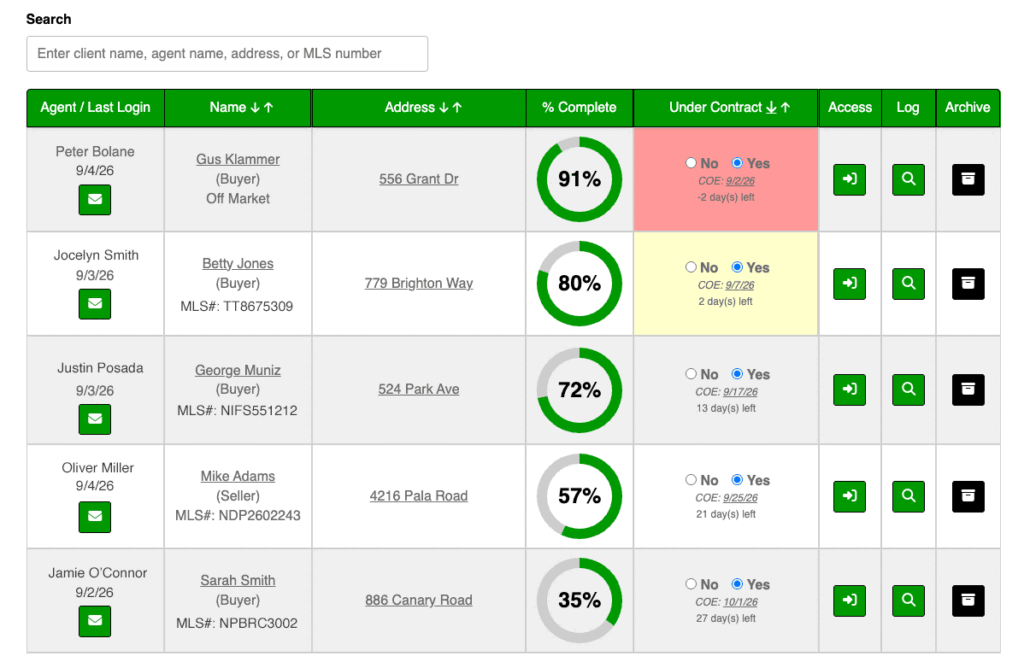
A real-time dashboard shows exactly where every agent is in every deal, so you can spot who's falling behind and step in early--not after a complaint.
For Brokers and Managers
See every deal in the office. Step in only when someone needs you.
Every agent, every deal, one screen
A live dashboard shows where each transaction stands, who is behind, and what is coming due, without you having to run the file.
Step into an agent’s account
Log in as any of your agents to help, train, or unblock a deal. You stay responsible; they still do the work.
Office-standard timelines
Build buyer and seller templates once. Assign them so every agent follows the same brokerage-approved steps.
A record you can pull at audit time
Open the activity log for any deal: who did what, when, and from where.
A vendor list for the whole office
Keep preferred, rated vendors in one place so agents are not each inventing their own list.
Agents run the deals. Clients always know What’s Next.
The steps are still the ones you set for the office.
Always Informed
Dates, deadlines, and who is responsible for which tasks, plus plain language explanations of the contract concepts along the way. Less “what happens next?” and fewer blank stares at the paperwork.
Look Prepared on Every File
Buyer and seller steps are already thought through. Agents look organized because the office template is doing the remembering.
Avoid the Usual Pitfalls
The timeline flags common misses on disclosures, loans, and timing so they are handled in order, not discovered in escrow.
Automated Alerts
Automatic reminders are in place so you never miss a task or deadline again. If a task is coming due within a few days and it is not already complete, the system will automatically alert the agent or client as appropriate.
Syncs with your Calendar
Critical dates can sync to Google, Outlook, Yahoo, or iPhone. Same dates the office is already tracking.
Brandable
Logo, headshot, and colors so the client experience matches the brokerage, not a generic third-party tool.
Additional Features
Pull Listings from the MLS
(optional add-on)
Type the MLS number, or we automatically find the listing using the agent’s DRE number, and What’s Next pulls the address, photos, and specs for buyers and sellers. When it goes under contract or is sold, the file updates.
Reply with the Contract
When the home goes under contract, reply to that email with the contract attached. Contract dates are automatically read and added to the site–no login required. Or drag and drop the purchase contract onto the file and wait for the site to do its magic.
Manage Multiple Clients & Timelines
When several files are open, jump from one roadmap to another. Deadlines stay visible without a separate spreadsheet.
Flexible for Each File
Skip steps that do not apply, adjust dates, and add custom tasks for an individual file, without throwing out the office template.
Checklists and Extras Included
Buyer and seller questionnaires, photo-prep, AVID, walkthrough, and other lists agents can use as-is.
Our Users Love It!